

If you are looking to sell Ethereum for Canadian dollars then you are in the right place. Below we will point you in the direction of a Canadian cryptocurrency exchange that allows you to sell ETH for Canadian dollars and transfer the funds into your Canadian bank account. The process is outlined in an easy to follow four step guide further down this page, with plenty of screenshots to make the transaction as simple as possible.
***Disclaimer: The content provided in this article is not financial advice. We are simply providing an information guide outlining how to sell Ethereum for Canadian Dollars, if that’s something you already intend to do. All readers should do their own research when deciding to buy or sell any cryptocurrencies online.
Where To Sell Ethereum from Canada
| Exchange | Bonus | Visit |
|---|---|---|
 |
Invest $100 Get $10 in BTC | Visit |
Kraken.com is one of the top cryptocurrency exchanges for Canadians. They offer ETH/CAD trades and allow you to withdraw Canadian dollars to your bank account.
**Full Disclosure: We are members of the Kraken affiliate program and may earn commission on user referrals.
How To Sell ETH for Canadian Dollars – 4 Step Guide
Follow this straight forward four step guide to learn how to sell Ethereum into Canadian Dollars and withdraw to your bank account.
Step 1. Open An Account With Kraken.com
The first step is to open an account with an online cryptocurrency exchange that offers ETH/CAD trading pairs and allows Canadian dollar withdrawals.
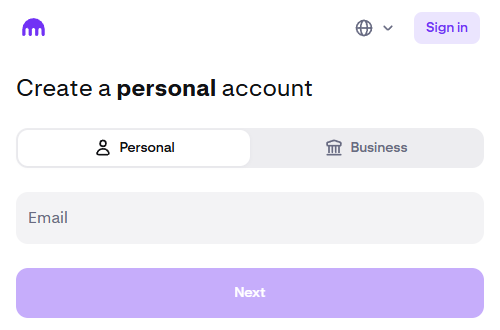
Click here to visit Kraken.com, then enter your email in the Create An Account form to start the sign up process. You will have to agree to the terms and verify your email to create your account.
You will then have to verify your identity before using the website. This involves completing the Kraken Know Your Customer process by providing basic personal information. The verification process is nearly instant and can be complete within minutes.
**Disclaimer** These materials are for general information purposes only and are not investment advice or a recommendation or solicitation to buy, sell, stake or hold any cryptoasset or to engage in any specific trading strategy.
Payward Canada Inc., operating as Kraken, has filed an application for registration in certain Canadian jurisdictions but has not yet obtained registration. Until such time as Payward Canada Inc., operating as Kraken, obtains registration, Payward Canada Inc. has agreed to abide by the terms of an undertaking available at the following page: https://www.securities-administrators.ca/wp-content/uploads/2023/04/20230324-Kraken-PRU-publication-version.pdf.
Step 2. Deposit Your ETH
Next you will have to deposit the Ethereum that you want to sell into Canadian dollars.
After logging into your account click ‘Deposit’ from the top menu bar on the Kraken Pro home page. Select ‘Ethereum’ and the Network that the deposit will be sent on. You will then be provided with a unique deposit address where you can send your ETH.
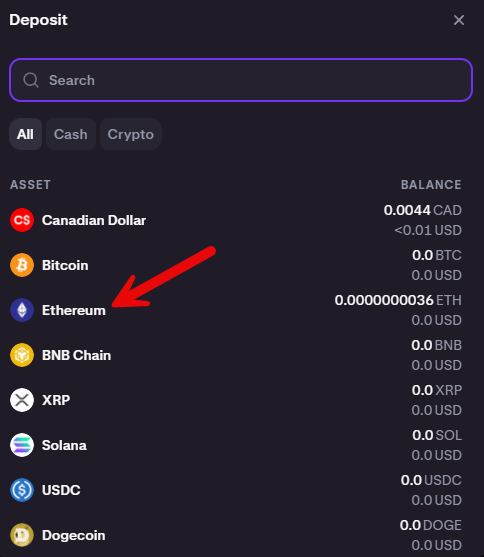
The ETH deposit page will provide you with the ETH wallet address where you should send the Ethereum you want to sell. ETH deposits on Ethereum are automatically credited to your account after 30 confirmations (estimated 6 minute processing time). You can check the progress of the deposit in the Recent Activity section of your Kraken Pro home page.
Step 3. Sell Your ETH
After the required confirmations (or shortly thereafter) the ETH deposit will show up in your account. It’s now time to sell your Ethereum for Canadian Dollars.
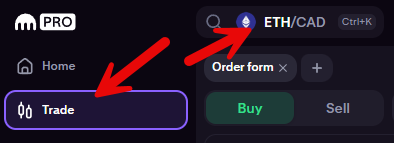
Click the ‘Trade’ button under ‘Home’ on the Kraken Pro home page, and then select ‘ETH/CAD’.
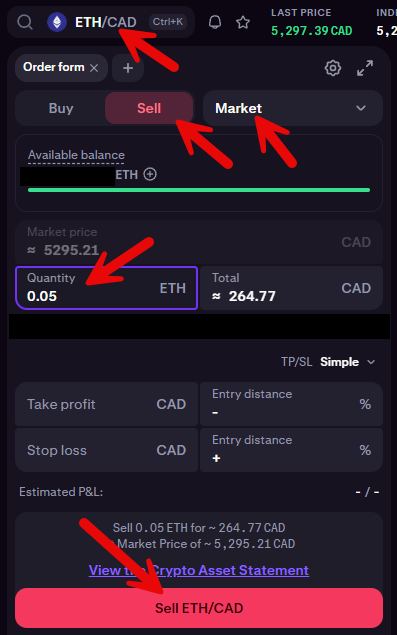
Select ‘Sell’ beside the Buy button because you want to sell your ETH for Canadian Dollars.
To make a quick sale make sure the order type is set to ‘Market’.
Enter the Quantity of ETH you want to sell for Canadian Dollars. Alternatively you can enter the Total amount of CAD you want to trade for. **The corresponding number will change when you alter either of these fields.
If the Quantity of ETH to sell and Total of CAD to buy amounts look good, then click ‘Sell ETH/CAD’ to complete the trade.
**In the below screenshot I’m selling 0.05 ETH for $264.7 CAD.
If you have a specific price you want to sell your ETH at you can switch ‘Market’ to ‘Limit’ and add a sell order at your specific price. In this case the trade would not be instant and you would have to wait for an ETH buyer to fill your order.
Step 4. Withdraw Canadian Dollars to Bank Account
After completing the trade your balances will adjust and the Canadian Dollars will be available in your account.
You now have the option to withdraw the Canadian Dollars to your Canadian bank account.
Click the 3 dots on the far right of your Canadian Dollar balance on your Kraken Pro home page and select ‘Withdraw’.
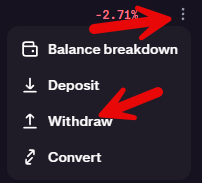
On the CAD withdrawal page you can select ‘Interac e-Transfer’ or ‘Wire Transfer’.
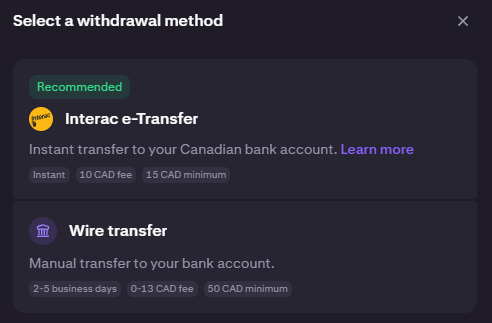
Interac e-Transfers are available for withdrawal amounts between $10 and $10,000, and wire transfers are available for withdrawal amounts of $50 and up.
We will be using the Interac e-Transfer withdrawal method for this guide. There is a flat $10 fee for Interac withdrawals.
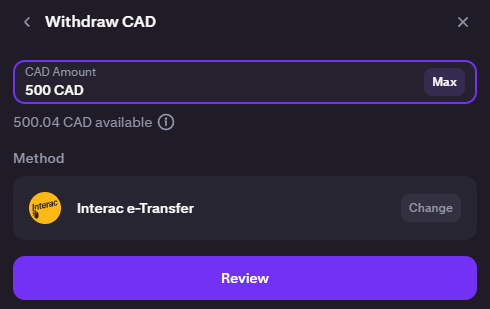
On the following page you will have to confirm your withdrawal amount and make sure your withdrawal details are correct.
You will then receive an Interac e-transfer to your Kraken registered email address within a few minutes. You will also receive an email with the security answer to the Interac transfer.
And that’s it. If you completed those steps you should have sold Ethereum into Canadian dollars and transferred the money into your bank account.