

If you are looking to buy Ethereum with Canadian Dollars then you are in the right place. Below I will point you in the direction of a Canadian cryptocurrency exchange that allows you to deposit Canadian Dollars via Interac or bank wire, and use those funds to purchase ETH. I’ve outlined the process in a straight forward step-by-step guide further down the page.
Disclaimer: The content provided in this article is not financial advice. We are simply providing an information guide outlining how to buy ETH with Canadian Dollars, if that’s something you already intend to do. All readers should do their own research when deciding to buy or sell any cryptocurrencies online.
Where To Buy ETH in Canada
| Exchange | Bonus | Visit |
|---|---|---|
 |
Invest $100 Get $10 in BTC | Visit |
Kraken.com is a popular cryptocurrency exchange for Canadians. They offer ETH/CAD trades and allow you to deposit Canadian Dollars from your Canadian bank account via Interac, bank wire, or bill pay.
Kraken is our recommended exchange for Canadians.
How To Buy Ethereum With Canadian Dollars – 4 Step Guide
Follow this simple four step guide to learn how to buy Ethereum online with Canadian Dollars from your bank account.
Step 1. Join Kraken.com
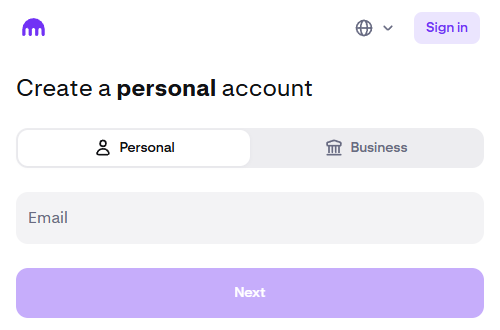
Click here to visit Kraken.com, then enter your email in the Create An Account form to start the sign up process. You will have to agree to the terms and verify your email to create your account.
After creating your account you will still have to verify your identity with Kraken by completing their Know Your Customer process before you can use the full functionality of the exchange. The identity verification process is a quick and easy requiring just basic information. It can be completed in a few minutes.
**Full Disclosure: We are members of the Kraken affiliate program and may earn commission on user referrals.
**Disclaimer** These materials are for general information purposes only and are not investment advice or a recommendation or solicitation to buy, sell, stake or hold any cryptoasset or to engage in any specific trading strategy.
Payward Canada Inc., operating as Kraken, has filed an application for registration in certain Canadian jurisdictions but has not yet obtained registration. Until such time as Payward Canada Inc., operating as Kraken, obtains registration, Payward Canada Inc. has agreed to abide by the terms of an undertaking available at the following page: https://www.securities-administrators.ca/wp-content/uploads/2023/04/20230324-Kraken-PRU-publication-version.pdf.
Step 2. Deposit Canadian Dollars From Bank
Next you will have to deposit the Canadian Dollars that you want to trade for Ethereum.
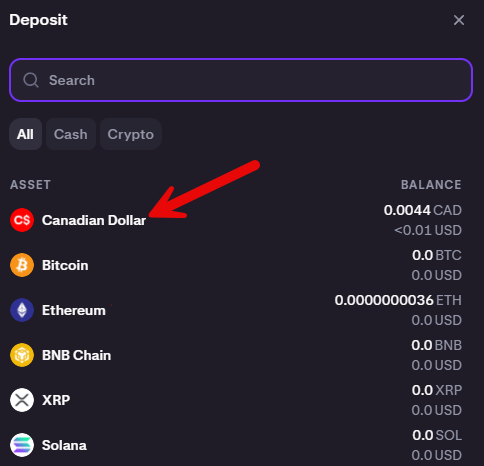
On your Kraken Pro home page click ‘Deposit’ from the top menu bar and choose Canadian Dollar.
You can deposit your Canadian Dollars via Interac e-Transfer (no fee, up to $10,000 daily), Bill Pay (0.25% fee) or Wire Transfer ($0-$3 fee).
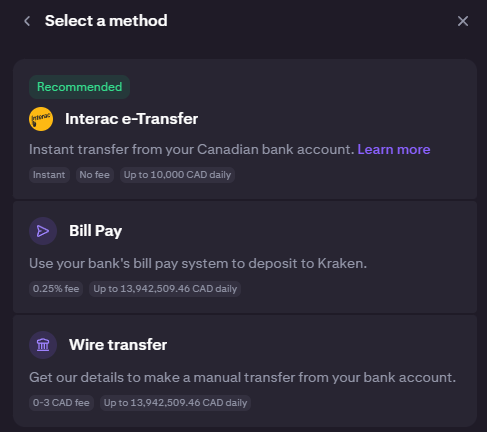
Enter your deposit amount on the following page and complete the instructions for your chosen deposit method to deposit your Canadian dollars.
Step 3. Buy ETH
The CAD Balance amount on your Kraken Pro home page will update with your deposit amount within minutes (if you used Interac e-Transfer). You’re now ready to buy ETH with your Canadian Dollars.
Select ‘Trade’ under the Home button on your Kraken Pro home page, and then select ‘ETH/CAD’ as your trading pair.
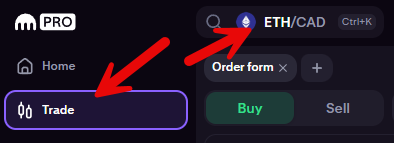
To quickly buy ETH make sure you have the ‘Buy’ button clicked and the type of order set to ‘Market’. Then enter the Quantity of ETH you want to purchase or the ‘Total’ amount of CAD you want to trade and click the Buy button.
In the example below I’m buying 0.0094 ETH with $50 Canadian.

After clicking ‘Buy’ the order will execute within seconds. Your ETH and Canadian Dollar balances will update and you can monitor the trade in your ‘Orders’ section at the bottom of the page (below the order book).
If you have a certain price you want to purchase ETH at you can also switch the ‘Market’ tab to ‘Limit’ and add your order to the order book at a specific ETH/CAD price. In this case you would have to wait for an ETH seller to fill your order.
Step 4. Withdraw ETH To Cryptocurrency Wallet Compatible with Ethereum (Optional)
After the trade you will see the ETH balance in your Kraken account.
You now have the ability to withdraw your ETH to an Ethereum compatible cryptocurrency wallet where you hold the keys.
This is an optional step because you can also leave the ETH in your Kraken account.
I suggest doing your own research on how best to store you ETH based on what you want to use it for. For example, if you’re planning to spend the ETH to purchase NFT’s, then transferring to a Metamask wallet may be right for you, whereas if you are holding the ETH for a longer period of time transferring to a secure hardware wallet may be the right move.
Do your own research to determine how to best store and use your ETH.